
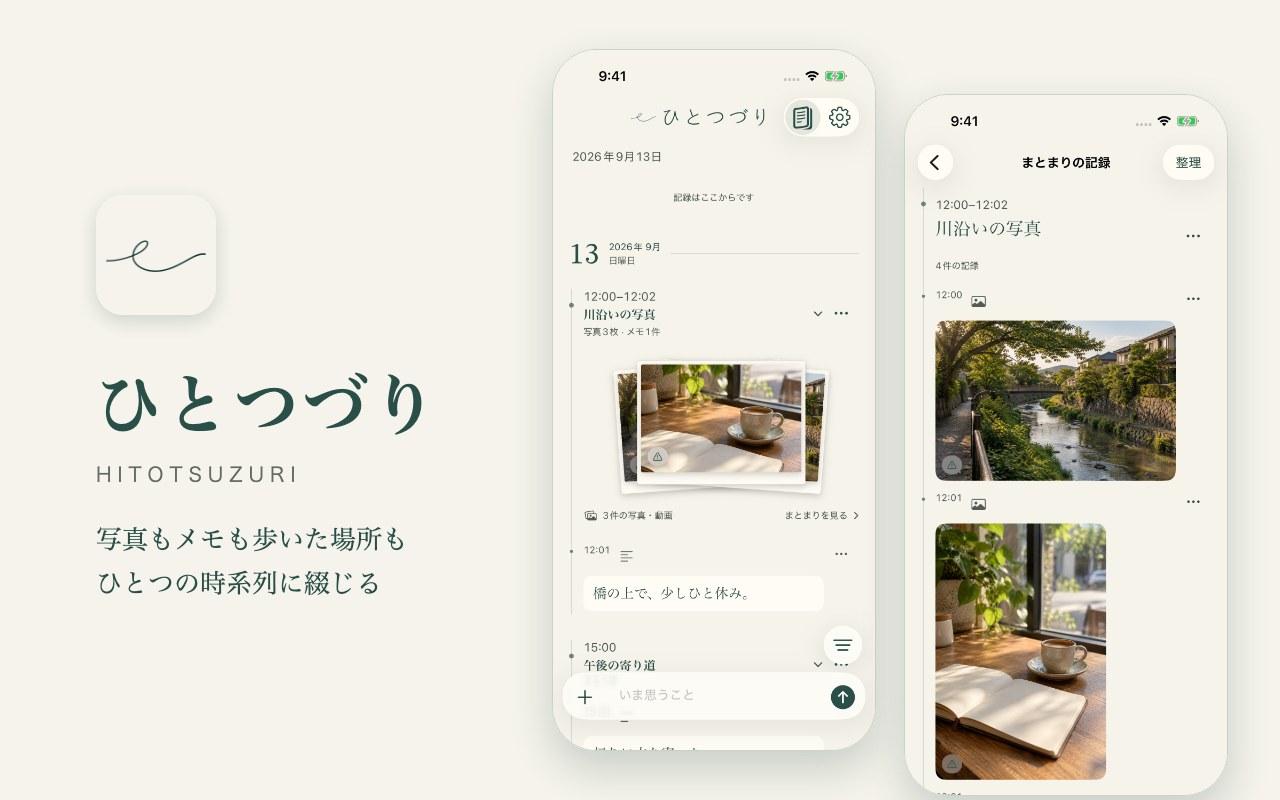
An iPhone app that binds photos, videos, notes, audio, and the places you've been into a single timeline to look back on. Even on days you didn't write a diary, a photo in your library or a short note remains — the app binds them together along the flow of time. Hitotsuzuri means "bound into one." Every record stays on the device; there is no server.
App Store: ひとつづり(opens in a new tab) / Website: hitotsuzuri.app(opens in a new tab)
Concept
Binding the memories of ordinary days into one.
- Import records that already exist. Records already in your life, such as the photo library and location history, are imported to keep daily input to a minimum
- Browse across kinds. Photos, notes, audio, and places aren't split by type; you follow the day's events together. Scrolling through the flow of life is the core of the screen
- You decide what belongs together. Records close in time or place form a "moment" automatically, and from there you can merge or cut them into the units you remember
- Never lose records. Not losing records to dropped connections or app exits — and being able to get stored records back out reliably — come first
Features
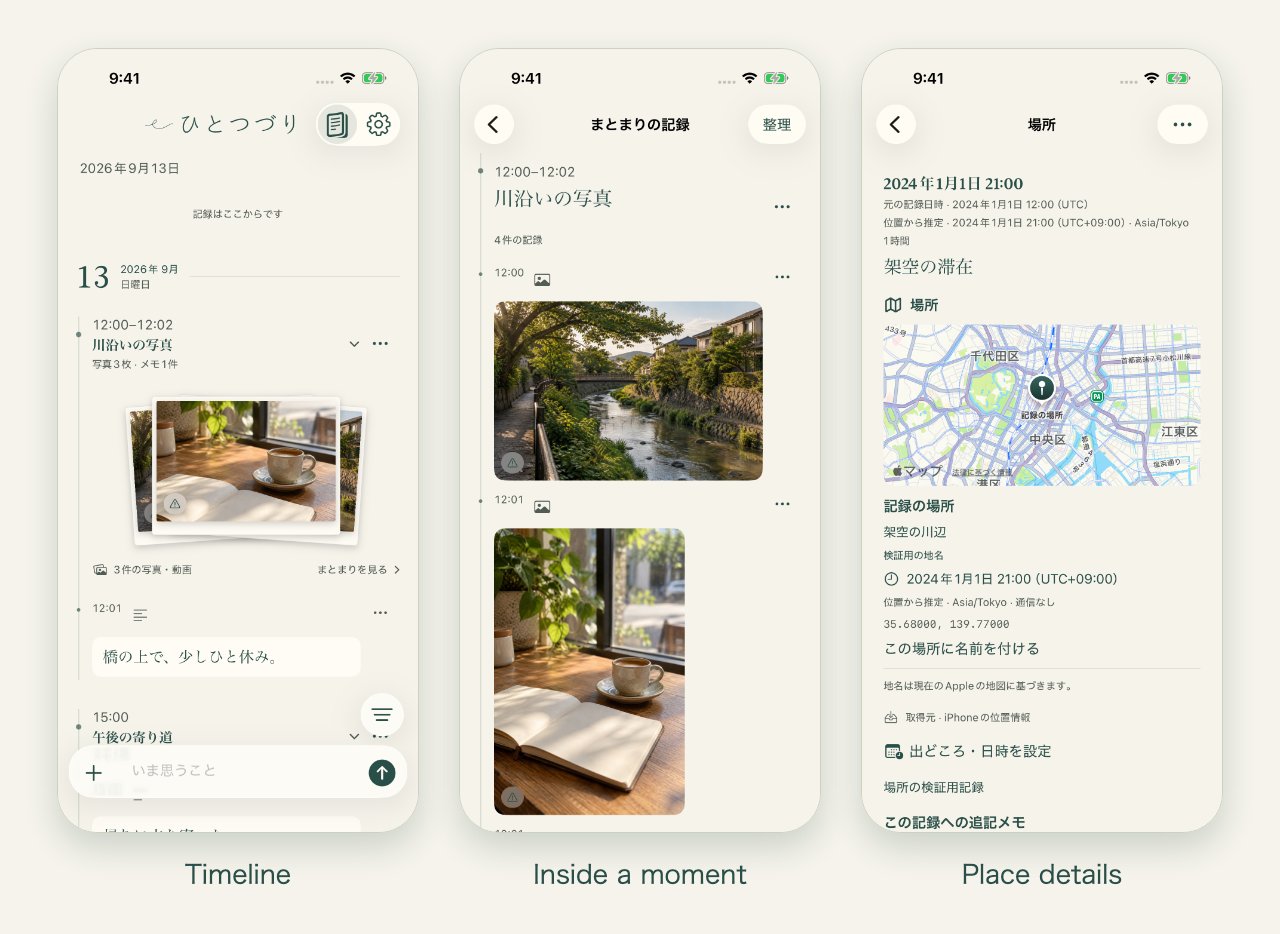
- Browse: A timeline with the past at the top and the latest at the bottom. Each moment shows a stack of photos, notes, audio, and moves and stays
- Merge and cut: Long-press a heading and drop it on another moment to merge them. Swipe a record to the right and a pair of scissors cuts the moment above it. Original records and times are never rewritten, and the last change can be undone
- Import: Photos and videos, the device's location history (stays and significant moves), sleep and workouts from Health, audio, notes, and Google Timeline exports
- Search: Filter by words, time, place, or kind, including place names you've added yourself
- Photo descriptions: Text in photos is recognized, and on supported iPhones the on-device model adds a one-sentence description. Images never leave the device
- Places and local time: The local time zone is estimated from coordinates without a network connection. Apple's maps and place names can be checked in a record's details, only if you turn them on
- Backup: Encrypted backups are written roughly daily or weekly to a folder you choose (such as iCloud Drive)
- Pricing: Keeping and browsing records is free. Editing moments comes with a two-week trial and a one-time purchase
Architecture
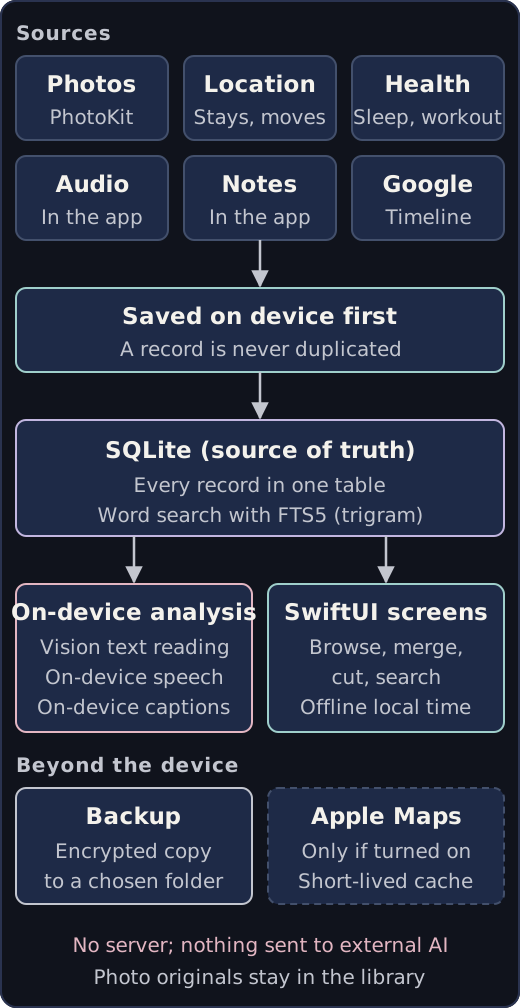
- SwiftUI: The screens, in Japanese and English (your own text and imported data are not translated)
- PhotoKit / Core Location / HealthKit: Importing photos and videos and showing originals, low-power visit and significant-move detection, and reading sleep and workouts
- SQLite: The source of truth for records. WAL with full synchronous writes favors durability, and keyword search uses FTS5 (with the trigram tokenizer, which Japanese needs)
- Vision / speech recognition / the on-device model: Text recognition and classification in images, on-device transcription, and photo descriptions. On devices or languages that can't process something locally, the app declines rather than sending it out
- MapKit: Maps and place names (only when turned on). Local time is estimated on the device from bundled boundary data
- Backup: SQLite's online backup API makes a consistent copy, which is encrypted with AES-GCM and written out, on a schedule through the OS's background tasks
- StoreKit: The trial and one-time purchase
Design decisions
Decisions are recorded in ADRs and design documents. These are the ones that best show what the problem was, what was compared, and what was traded off.
Records stay on the device
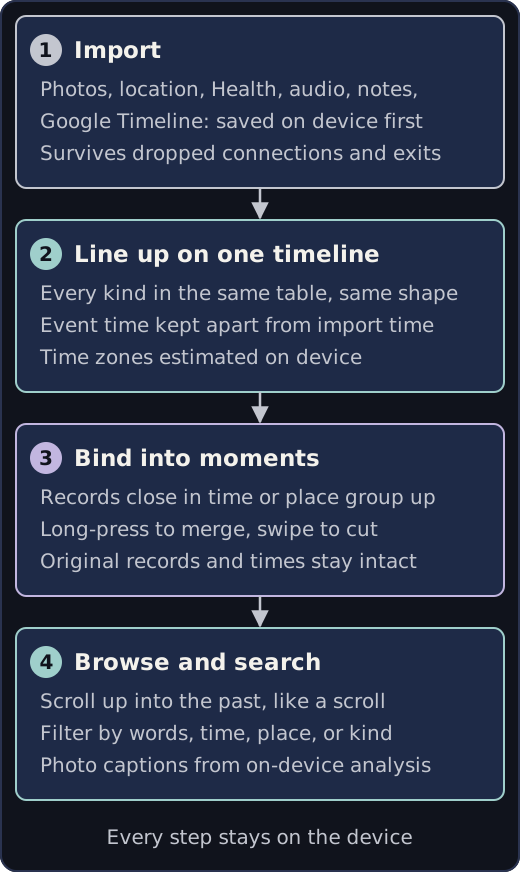
- Life records stay only on the user's own device. Saving, browsing, editing, searching, and deleting records, as well as writing backups, all happen on the device. Working with records needs no network connection, and there is no server to operate. The only connections beyond the device are Apple's system services — such as fetching photo originals or transferring backups to their destination — and Apple's maps and place names when the user turns them on
- The source of truth is SQLite on the device. WAL with full synchronous writes favors durability, and the file protection level lets imports such as location continue while the screen is locked
- Location, audio, and imports are first saved to a ledger on the device before becoming records, so dropped connections or app exits don't lose anything and work resumes where it left off
- Schema changes are applied in order as on-device migrations, and a database from an unknown version is never opened
- The trade-off: getting records back out reliably depends on backups (see below)
Every record in one table
- Photos, audio, locations, notes, and Health data all have different shapes. Splitting tables by shape would split display and search by shape too
- A single
eventstable holds the kind, with shape-specific attributes in JSON. Searchable text has its own column so a full-text index can be built on it - The time of the event is always kept apart from the time of import, and an end time exists from the start for events with a duration (such as stays or sleep). Times are UTC integers with the offset stored separately
- When a photo's time zone is unknown, it is not guessed from the device's current setting. Instead, the region is estimated on the device from the coordinates and bundled boundary data, and stored separately from the original offset. Points near ambiguous boundaries stay unknown
- The timeline comes back mixed in a single query
Not keeping photo originals
- Photo and video originals stay in the photo library (and iCloud Photos); only the photo identifier is kept. Storing them twice would cost both space and privacy
- Images are drawn from the original at the size needed. The one image kept locally has a single job — to remain as a record when the original is gone or unreadable — so it is a small thumbnail
- The trade-off: delete the original in the Photos app and only the thumbnail remains. The app says so plainly ("the original photo can't be found") rather than hiding it, because only the user knows whether it was deleted or access wasn't granted
- After moving to a new iPhone, originals can be matched up again even if photo identifiers change
Never import the same record twice
- Imports run repeatedly and overlap — new photos, automatic imports when the app opens, Google Timeline exports — and stopping partway is normal
- The idempotency key is a unique constraint on
(source, source_id). Importing again returns the existing record without rewriting it, and records the user has hidden don't reappear - If an import stops partway, it resumes from the ledger saved on the device first
AI only on the device
- Records are never sent to external AI. Every core feature works with just on-device processing (import, browse, edit, search, delete) and on-device AI (transcription, text recognition and classification in images, photo descriptions)
- Photo descriptions are added only on iPhones that can run the on-device model. Images never leave the device, and off-device processing isn't used. On devices where it isn't available, the app explains how to enable it for each situation
- The trade-off: there is no semantic search. The on-device embeddings were confirmed not to support Japanese, so full-text search (FTS5) takes its place
Backups that make records retrievable
- Backups are what guarantee records can be retrieved. SQLite's online backup API makes a consistent copy, which is encrypted with AES-GCM into a single file and written to a folder the user chooses. Swapped or reordered chunks are detected
- If writing fails partway, the previous backup remains. Old backups are deleted only after a new one is complete, and manual backups or those from other devices are never deleted
- Restoring never overwrites the database in use; it unpacks into a separate storage area and then switches over
- Because the OS decides when background work runs, no fixed schedule is promised; the app also checks for overdue backups when it comes to the foreground. "Saved" to iCloud Drive and similar means the file was handed to the provider, not that the upload to the cloud finished
Checking places is optional
- Local time is estimated offline from bundled boundary data. Checking Apple's maps and place names is off by default, and coordinates are sent only when it's turned on. Responses are kept only briefly and never stored with the records
- Place names you add yourself ("the usual café") are saved on the device and shown in lists and search without rewriting the original coordinates or titles
- Weather was removed, because its ongoing usage-based cost didn't fit a one-time purchase
Screens: following time like a picture scroll
- Paper tones, deep green, and a thin binding thread make a screen where you scroll through time like a picture scroll (emaki). When a record's time zone is known, the background reflects the color and light of that time of day
- The list is read in units of moments rather than individual records, with photos shown as a loosely overlapping stack that opens to the full moment
- Merging and cutting are treated as display-level organization that never changes the original records or times, and can be undone. The first-run guide lets you try them on fictional records
Development and operations
- Developing with AI agents: The service's philosophy, screen rules, and design principles live in
AGENTS.mdanddocs/, with each decision made at my instruction added with its date as the work goes on - iOS: The project is generated with XcodeGen, with an Xcode Cloud configuration. App Store screenshots are taken by a UI test that creates fictional records
- Release preparation: Legal requirements, privacy disclosures, and the purposes of each permission were organized in documents, and a privacy manifest is included
- Website: A static site in Japanese and English, published from GitHub Actions. Its screen images are captured with fictional records, and the site says so